NotaeLibrary
🔍 Adding Web Research
Web Research asks Nixie to investigate a question on the web and writes the answer to the bookshelf as a Notae. You can run it once or schedule recurring refreshes, then pick which discovered sources to keep as shelf links. This guide covers the page, depths, credits, scheduling, and sources.
🔍 Research📝 Notae output🪙 3 / 8 / 20 credits👑 Owner / Moderator
On this page
🔍
What Web Research is
Web Research gives Nixie a question, lets it search the web, and saves the synthesized answer as a Notaeon the room's bookshelf. The Notae becomes part of the room's knowledge: it is indexed, readable, and discussable like any other shelf entry.
The run also returns a list of sources. You can keep the research on its own, or select some of those sources and add them as separate shelf links.
🧠 Synthesized answer
Nixie reads across sources and writes one Notae, not a pile of raw results.
📚 On the shelf
The result is saved to the bookshelf and indexed like other room knowledge.
🔬 Sources too
The run reports the pages it relied on; you choose which to keep.
🔁 Optional schedule
A recurring research feed can refresh the Notae on an interval.
ℹ️It is a research run, not a live page. Each run asks the question again and rewrites the Notae; the previous content is replaced (the history stays in the feed config).
🧭
Research, MCP, RSS, or link?
| Source | Use it for |
|---|---|
| 🔍 Web Research | A question that needs synthesis from several web sources. |
| 🔌 Custom MCP Feed | A tool on an MCP server that returns structured live data. |
| 📡 RSS / News Feed | A published feed of articles or videos from one source. |
| 🔗 Web Link / Article | One page you already know you want on the shelf. |
💡If you know the page, use a link. Research is for a question that spans sources; a link is for a page you already chose.
👑
Who can run it
Only the room owner and moderators can run web research. The card is hidden from contributors and members, and the page redirects them away.
👑 Owner
Can run research. Every run is charged to the owner's credits.
🛡️ Moderator
Can run research; the credits still come from the room owner.
✍️ Contributor / 👤 Member
Cannot run research. They can read the resulting Notae.
⚠️Credits are owner-funded. A scheduled STANDARD run is 8 credits every refresh — 56 credits a week at daily. Agree on the schedule before enabling one.
🧰
Before you start
❓ A specific prompt
Ask one clear question, with the context, scope, and timeframe you care about.
🎚️ A depth
Brief (3), Standard (8), or Deep (20). Deeper asks more of the research and takes longer.
🧭 Optional guidance
Point at preferred sources or require cross-checking. Skip domains you do not trust.
🪙 Enough credits
At least the depth cost on the room owner's account for the first run.
ℹ️One question per Notae. A focused research question produces a focused answer. Split unrelated questions into separate Notaes.
🧭
Where to find it
On the room's Add to Bookshelf page, the Live data feeds section holds the 🔍 Web Research card. It is visible only to owners and moderators and opens the dedicated page.
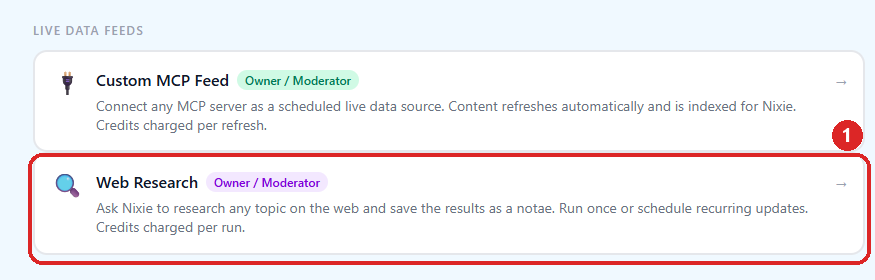
The page lives at /study-rooms/<room>/bookshelf/add/webresearch.
🖼️
The Web Research page
The page is a short brief: what to research, how deeply, which sources to prefer or avoid, and whether to repeat it.
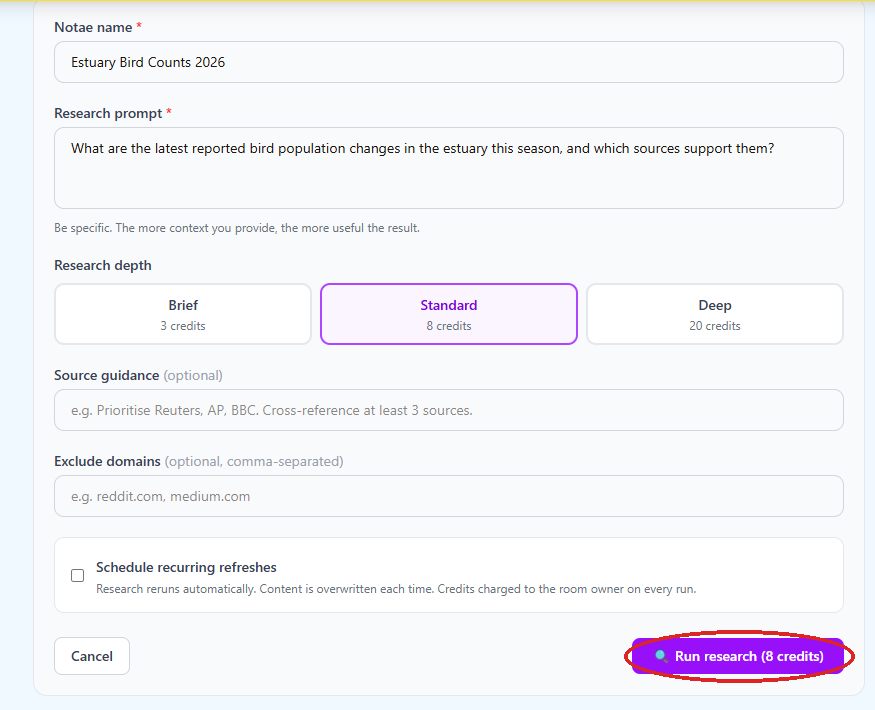
🏷️ Notae name
What the resulting shelf entry is called. Name it for the question.
❓ Research prompt
The actual question. Be specific about scope and recency.
🎚️ Research depth
Brief / Standard / Deep, each with its credit cost.
🔁 Schedule
Off by default. Turn it on and choose 6h, 12h, daily, or weekly.
➕
Step by step
1
Open the room's Add to Bookshelf page
Bookshelf → Add Knowledge to Bookshelf.
2
Open Web Research
In Live data feeds, click 🔍 Web Research.
3
Name the Notae
Use the question itself, e.g. “Estuary bird counts 2026”.
4
Write the prompt
State the question, the scope, and the timeframe. Add context the researcher would need.
5
Pick a depth
Brief for a quick status, Standard for most questions, Deep when you need a thorough review.
6
Add guidance and exclusions (optional)
Prefer specific outlets, require cross-checking, or exclude domains you do not want cited.
7
Decide on a schedule
Leave it off for a one-time answer. Turn it on and pick an interval for a recurring brief.
8
Run research
Click 🔍 Run research (N credits). Deep runs can take up to a minute.
9
Choose sources, or go to the shelf
The Notae is added first. If sources were returned, select any you want as shelf links and add them — or click Go to bookshelf.
💡The Notae is saved before the source list appears. If you close the page or go to the shelf, the research result is already on the bookshelf; only the extra source links are skipped.
🎚️
Research depths and credits
| Depth | Credits | Best for |
|---|---|---|
| BRIEF | 3 | A quick status check, a definition, or a one-paragraph update. |
| STANDARD | 8 | The default: a balanced answer with several sources. |
| DEEP | 20 | A thorough review, competing claims, and a longer synthesis. |
⚠️Depth is not free.The credits are charged when the run completes, from the room owner's balance. A scheduled run charges the same amount every time.
🔬
Discovering and adding sources
After the research, the page lists the sources the run used. Each card shows the title, domain, and snippet. Select the ones worth keeping and add them to the shelf.
☑️ Pick individually
Select all, deselect all, or tick the sources that matter.
📎 Separate shelf links
Each source becomes its own shelf entry linked to the research Notae.
🚫 Duplicates skipped
A URL already on the shelf is reported as skipped, not added twice.
🛡️ Approval applies
Added sources follow the room's approval setting for your role.
ℹ️The Notae is the indexed synthesis. Selected sources are saved as links with their title and snippet — the same as adding a Web Link — so the research answer, not each source page, is what the assistant reads first.
🗄️
What gets saved
📝 The research Notae
The synthesized answer, saved to the bookshelf and indexed for the room's assistant.
🏷️ Name and prompt
The Notae name and the prompt are part of the entry's context.
🗂️ Schedule config
When scheduled, the interval and refresh history live with the entry.
🔗 Chosen sources
Each selected source is its own shelf link, linked back to the research Notae.
ℹ️Approval can apply. If the room requires approval, the research Notae starts as pending; the scheduled refresh only runs on approved entries.
🔁
Scheduling and refreshes
With Schedule recurring refreshes on, the platform re-runs the same prompt on your interval, replaces the Notae content with the fresh answer, and re-indexes it. Each refresh is charged at the chosen depth.
1
The first run
Happens immediately when you click Run research. You see the result before anything is scheduled.
2
The next run
The platform schedules it for the interval you chose — 6 hours, 12 hours, daily, or weekly.
3
Content is replaced
The new synthesis overwrites the old body; a compact refresh history is kept in the entry's config.
4
Credits are checked
If the owner lacks the required credits, the research feed is paused with an error explaining why.
5
Approval gates refreshes
A pending Notae is not refreshed until it is approved.
⚠️Scheduled deep research is expensive. 20 credits a day for DEEP is 140 a week. Set the interval to match how fast the answer actually changes.
🔐
Who can do what
| Action | Member | Contributor | Moderator / Owner |
|---|---|---|---|
| Read a research Notae | ✅ | ✅ | ✅ |
| Open the Web Research page | — | — | ✅ |
| Run research | — | — | ✅ |
| Schedule recurring research | — | — | ✅ |
| Add discovered sources | — | — | ✅ |
✅ always · — never. Research is steward-only because every run charges the room owner.
💡
Best practices
💡Ask a question you could grade.“What changed in the estuary bird counts this season, and which sources say so?” produces a better Notae than “birds”.
💡Start at STANDARD. Move up to DEEP only when the question really needs a long review; move down to BRIEF for status checks.
💡Use guidance to anchor quality. Naming preferred outlets and asking for cross-checking improves the synthesis more than a longer prompt.
💡Add only the sources you will revisit. The research Notae already carries the synthesis; every extra link is shelf noise unless the room will read it.
⚠️Check the owner's credits before scheduling. A paused research feed is easy to miss when the room expects fresh answers.
❓
FAQ
▶Why is Run research disabled?
It needs a Notae name and a research prompt. The button also shows the credit cost of the selected depth.
▶How long does a run take?
Brief and Standard usually return quickly; Deep can take up to about a minute. The button shows a researching state while it runs.
▶Where did the research Notae go?
It is added to the bookshelf as soon as the run succeeds. If the room requires approval, it starts as pending and waits for a moderator.
▶Can I keep the sources without keeping the Notae?
No. The Notae is the research result and is added first; the source cards are optional extras on top of it.
▶A source says it was skipped.
That URL is already on the room's shelf. Duplicates are skipped rather than added twice.
▶Does a scheduled run create a new Notae each time?
No. The same Notae is updated in place with the fresh synthesis, and a compact refresh history is kept.
▶What happens when the owner runs out of credits?
The scheduled research pauses and records the reason on the entry. Top up the owner's credits before relying on the feed again.
▶Can a contributor run research?
No. Only the room owner and moderators can run or schedule research, because each run charges the owner.
🚀
Try it on a real room
Open the example room's Web Research page, or continue with the rest of the shelf.
🔍→📚→🔌→📡→🎓→
Open the Web Research page
See the dedicated form for Distracted by Birds.
Bookshelf Knowledge
How research Notaes, links, documents, and feeds become one room knowledge base.
Adding a Custom MCP Feed
Connect an external MCP tool as a scheduled live data source.
Adding RSS & News Feeds
Subscribe to a published feed of articles or videos.
All tutorials
Browse the full tutorial library for more guides.
Turn a question into a shelf Notae
Ask once, keep the sources that matter, schedule it only if it changes.